Start your 14-day free trial Every Agency feature switched on. No card required.

Work Intelligence

You sold twenty hours. It’s the 19th. Are you going to make it?

SEO retainer tracking, on each client’s own billing cycle. AlmaSEO logs the hours you actually work against the hours you actually sold, then tells you — today, while there’s still month left — what you’d have to deliver each day to finish, and whether that number is one a human can sustain.

Every timer tells you where the time went. None of them tell you if you’re going to make it.

Time trackers are built for billing somebody. You start a clock, you stop a clock, and at the end of the month you get a total that is only useful for producing an invoice. The number arrives after every decision that could have been changed by it.

The question that actually matters on a retainer is different, and it has a deadline: given what I’ve already delivered and how many working days are left, what do I have to do each day from here? That number moves every single day. Nobody computes it, so people carry a vague sense of being behind, and find out they were right in the last week of the month.

AlmaSEO computes it. Hours sold, hours logged, working days remaining — per client, with each client’s own billing cycle — and it puts today’s number where you’ll see it without going looking.

For the person doing the work — who is usually also the person who sold it.

For the solo SEO or consultant on retainers

Nobody else is watching whether the month is deliverable.

You sold the hours, you deliver the hours, and you invoice for the hours. The only warning that a month has gone wrong is the feeling that you’re behind — which shows up about a week too late to fix.

  • Today’s number, per client, with their billing cycle respected
  • A timer that rounds sanely and a log that takes ten seconds
  • An honest read on whether your pace is sustainable or just survivable
For anyone who has quietly over-delivered

The client eating double their hours is invisible until you look.

Over-delivery doesn’t announce itself. It arrives as a client who is lovely to work with, asks for one more thing every week, and slowly consumes the margin on every other account you have.

  • Any client past their quota, named, with hours over
  • Hours over, visible before the period closes rather than after
  • Overage rolls into next period rather than quietly vanishing

Getting the hours in, and what the SEO retainer tracker does with them.

Nothing here costs Data Credits. It’s all built from work you log against clients you’ve added.

The work timer

Start it, forget it, and answer the questions afterwards.

One click, and the questions come later

Start the timer and get on with the job. When you stop it, AlmaSEO opens the log dialog already filled in with the time — you pick the work type and write the note then, not while you’re trying to start working.

Rounded the way you’d round it anyway

Time lands in fifteen-minute increments, and the timer stops itself at eight hours rather than quietly running all weekend because you closed your laptop.

Up to three running at once, in the top bar

One timer per client, visible wherever you are in AlmaSEO, so a timer you started on one account doesn’t disappear the moment you open another.

Or skip it entirely

Log work manually against any date, or a date range, across seventeen work types — calls, meetings, research, DNS and hosting, competitor analysis, design, admin. You can also add time to any entry AlmaSEO logged automatically, so an audit that took you two hours of follow-up reflects that.

Plan Logging work is on every plan, Solo included. The timer runs in your browser — see the honest note below.

Powered by15-minute increments8-hour auto-stopSeventeen work typesBackdatingDate ranges

Retainer Tracker

Hours sold versus hours logged, on the client’s own billing cycle.

Their cycle, not the calendar month

Set the hours and the day their cycle turns over. A client who bills on the 12th is measured from the 12th, so the numbers mean something to the person paying them.

Pace, not just a total

Ahead, on track, or behind — measured against where you should be by this point in the period, not against the finish line. Being at 40% on day four is fine; being at 40% on day twenty is the thing you needed to know.

Close the period and carry the overage

Closing a period snapshots it. Hours you went over roll into the next period as time already spent, so over-delivery follows you honestly instead of resetting to zero and happening again.

The history stays

Every closed period is kept, so “do we consistently blow through this retainer” is a question with an answer rather than an argument.

Plan Pro and up.

Powered byPer-client billing dayRolloverWrite-off optionPeriod historyChange audit log

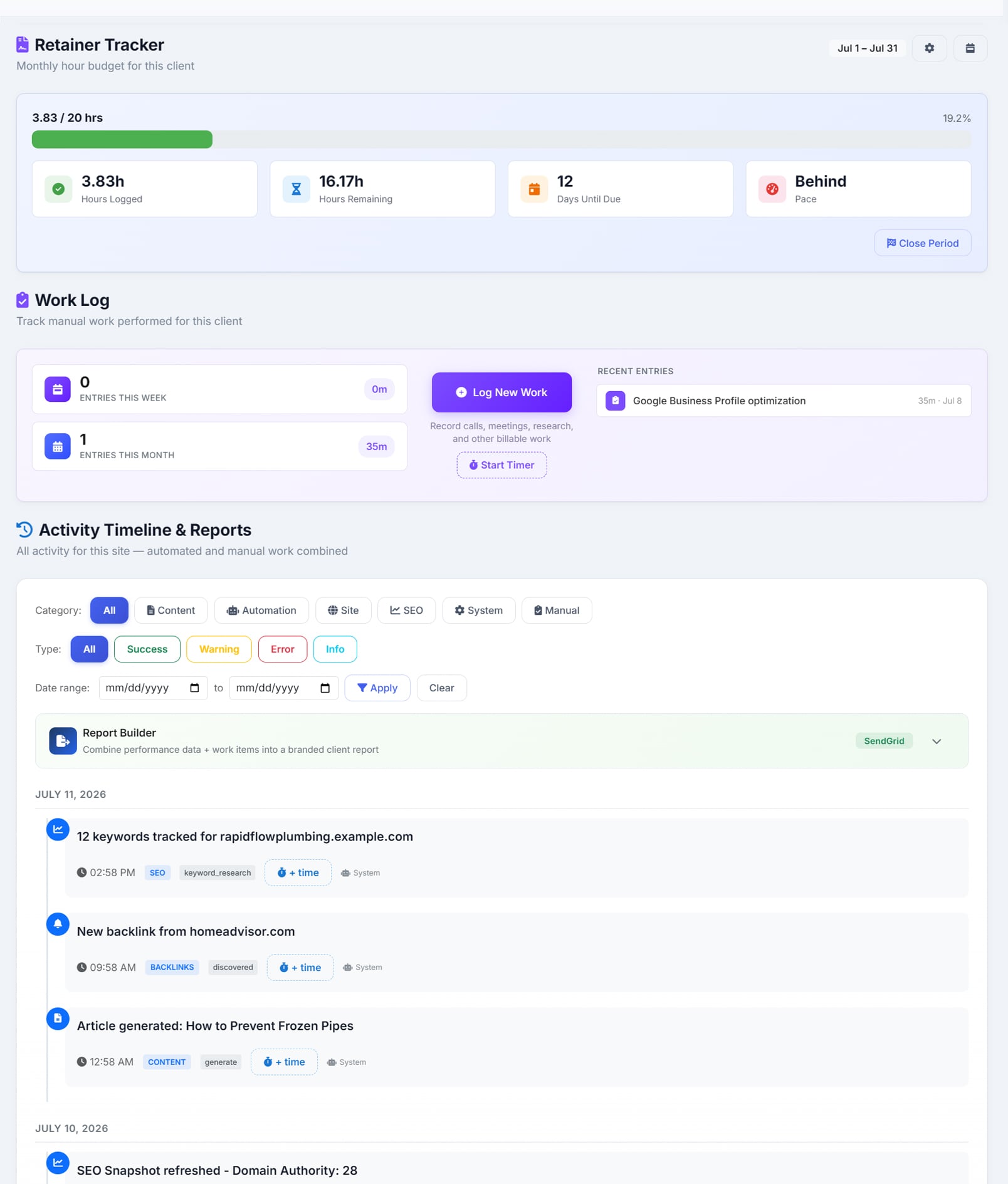
The Retainer Tracker on a client’s Activity and Logs tab, with a progress bar reading 3.83 of 20 hours at 19.2% and a pace read of Behind
3.83 of 20 hours, 12 days to go, and a one-word verdict: behind. The work log and the timer sit directly beneath it. Subtitled ‘monthly hour budget for this client’ and scoped to July 1 to July 31, the progress bar reads 3.83 of 20 hours at 19.2%, with cards for 3.83 hours logged, 16.17 hours remaining, 12 days until due, and a pace read of Behind, alongside a Close Period button. Beneath it the Work Log shows entries this week and this month with their totals, a Log New Work button, a Start Timer button, and a recent entry for Google Business Profile optimisation at 35 minutes. Below that the Activity Timeline and Reports, filtered by category and type, where each automated entry — keyword tracking, a new backlink, a generated article — carries an ‘add time’ button.

The daily target

One number, in the top bar, on every page.

What today has to look like

The hours you’d need to work today across every client to stay on track, summed per client so that mixed billing cycles come out right. It sits in the top bar of every page rather than on a dashboard you’d have to remember to open.

And what happens if you don’t

AlmaSEO also works out tomorrow’s number if you do nothing today, and how much each hour you work now takes off it. Procrastination stops being abstract.

It says which client, not just how many hours

Clients with only a few working days left, clients already past quota, clients with nothing logged this period at all, and the heaviest remaining account — each named, rather than folded into one total.

Compression, called out early

When the pace the plan now needs is one and a half or two times the pace you’ve actually kept over the last thirty days, AlmaSEO says so while the month can still be rescued.

Plan Pro and up.

Powered byPer-client targetsTomorrow's targetCycle close warningsCompression ratioMonth-on-month momentum

The burnout check

Read together, not as a step count.

Consecutive heavy days

Three days in a row at eight hours or more is flagged; five escalates it. Not because a long day is bad, but because the fifth in a row is a different thing from the first.

Weekends, counted

Working three of the last four weekends is a fact about how the business is running, not a personality trait — and it’s stated as one.

Rest days, and the lack of them

No rest day in the last seven is flagged; one or fewer in fourteen escalates. AlmaSEO also watches for three consecutive rising weeks on top of a forty-hour week.

And a target that isn’t humanly possible

When the arithmetic says you’d need twelve hours a day to finish, the honest answer isn’t to show you the number and wish you luck. It’s to say the plan is unreachable, show the most you could actually achieve, and let you have the conversation with the client while there’s time.

Plan Pro and up. Rule-based, not AI — every threshold is a fixed number you could look up.

Powered byHeavy-day streakWeekends workedRest daysEscalating weeksReachability check

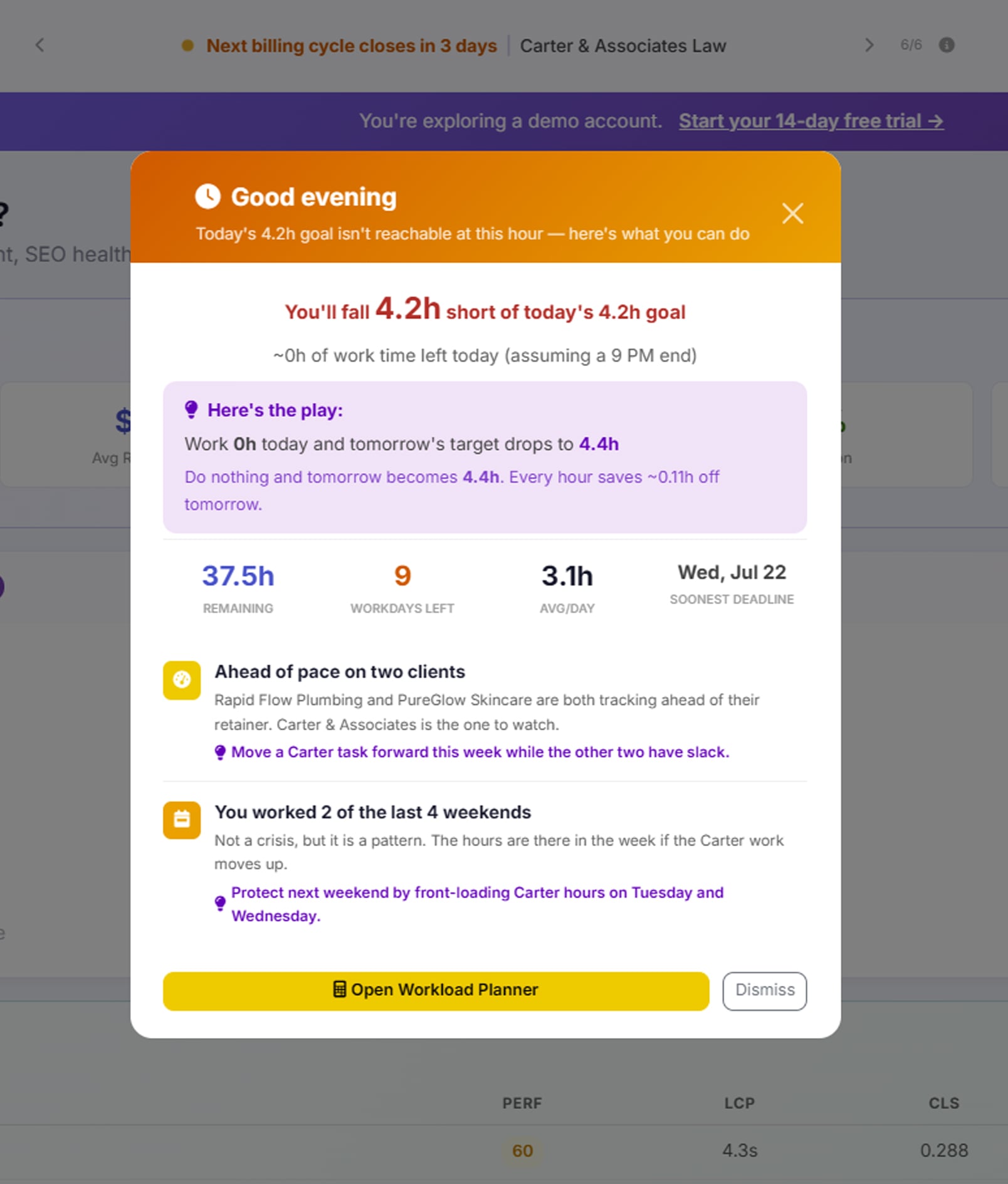
The daily target ticker in the AlmaSEO top bar, with the headspace check open beneath it saying today’s 4.2 hour goal is no longer reachable at this hour
“Today's 4.2h goal isn't reachable at this hour.” So it says what tomorrow becomes, and what to move. The ticker reads ‘next billing cycle closes in 3 days’ beside the client it belongs to, with arrows to step through the other readings. Below it the headspace check has opened: headed ‘Good evening’, it says today’s 4.2 hour goal is no longer reachable at this hour and that roughly no work time is left assuming a 9pm finish. A panel headed ‘here’s the play’ explains that doing nothing today makes tomorrow’s target 4.4 hours, and that every hour worked now saves about a tenth of an hour off tomorrow. Beneath that, 37.5 hours remaining, 9 workdays left, an average of 3.1 hours a day, and the soonest deadline. Then two readings — two clients tracking ahead of their retainer with a third named as the one to watch, and a note that two of the last four weekends were worked, called a pattern rather than a crisis — each followed by a suggested next move.

Turning hours into an invoice

The logged time goes out the door as money.

Hours grouped by work type, on an invoice

Pull a date range, see the hours broken down by what you were doing, and turn it into an invoice without retyping anything.

And into the client’s report

Hours can appear on the work report the client receives, or be hidden from it — a per-client switch, because not every client should see the clock.

Plan Pro and up. The rate is worked out from the retainer — see the honest note below.

Powered byGroup by work typeDate rangeShow or hide hours in reports

Six things this is not, said plainly.

This is the category where software oversells hardest. Here is exactly where AlmaSEO stops.

The timer lives in your browser.

It isn’t stored on a server. There’s no start/stop history and no sync, which means a running timer does not survive clearing your browser data, switching to another device, or a private window. It rounds to fifteen minutes and stops itself at eight hours. For its actual job — you, at your desk, timing the thing you’re doing now — that’s fine. If you need a timer you can start on a phone and stop on a laptop, this isn’t that, and no amount of careful wording would make it that.

There is no team time tracking.

Not a thin version — none. Nothing in AlmaSEO adds up hours by person, so there are no per-seat timesheets, no team utilization, no approvals, and no answer to “who worked on what.” Everything on this page is about one person’s workload. If you have staff whose hours you need to account for, you need a different tool for that part, and you should know it before you sign up rather than after.

There is no billable versus non-billable split.

Every logged minute counts the same. You can categorise work by type — and admin, correspondence and research are among the types — but there is no flag that marks an entry unbillable, and no report that separates the two. Your retainer numbers therefore include time you might not have charged for. That’s a real limitation, not a philosophy.

A client with no retainer hours set is invisible to all of it.

The daily target, the ticker and the burnout check are all built from hours sold against hours logged. Set no retainer on a client and that client contributes nothing to any of them — you can still log time against it, and it still shows in the log, but it won’t move your target. Project work and internal work sit outside this system entirely.

There’s no holiday calendar, and it matters.

AlmaSEO infers rest days from days with nothing logged, which means it cannot tell a holiday from a quiet Tuesday. Book two weeks off and the target for every remaining day of that period goes up accordingly, because as far as the arithmetic is concerned those days were available and you didn’t use them. Worth knowing before you plan a month around the number.

Nothing here is AI.

The burnout check is a set of fixed thresholds — three heavy days, three of four weekends, no rest day in seven. No model is judging your working patterns and no data is going anywhere to be scored. It’s arithmetic you could do yourself, done every day without you having to remember to.

Which plan you need.

Recording time is on every plan. Knowing what the time means is Pro.

Solo

The work timer and the full work log — every work type, backdating, date ranges, adding time to entries AlmaSEO recorded for you, and the log itself with its filters and export. You can track where your time goes on Solo. What you can’t do is set what the time was sold for.

Pro — where this area actually lives

Retainer hours per client with their own billing cycle, pace against that quota, period close with overage rollover, the daily target in your top bar on every page, the compression warning, and the burnout check with its heavy-day, weekend and rest-day reads. Also invoicing from the hours you logged. This is the reason to leave Solo if you work on retainers.

Agency

Everything above, plus the full-page Workload Planner — the same pacing maths rendered across your whole book at once, with the client priority queue and the scope-creep flags, sitting inside the wider agency operations layer — and the margin view, which puts a rate against those hours and tells you which clients are actually worth keeping.

One thing to be clear about on invoicing: the hourly rate is worked out from the retainer — the fee divided by the hours sold — rather than being a rate you set directly. There are no per-work-type rates and no rounding rules. It’s built for retainer clients, which is what most of this page assumes you have.

Find out whether this month is still deliverable.

Set the hours you sold, log a week of work against them, and the number in your top bar starts telling you the truth about the other three.