Agency Operations

SEO project management for twenty clients, not one website.

A recurring work plan for every client, one screen showing which of them is owed work this week, and a planner that tells you when a client has quietly started eating twice the hours you sold them.

Every SEO tool is built for one website. You have thirty.

The tools assume a single site and a single person looking at it. So the moment you have a book of clients, the actual job stops being SEO and becomes remembering: who is owed work this month, which account hasn’t been touched in three weeks, which one is eating hours nobody is billing for, and what exactly you promised to do every Tuesday for the client who signed in March.

That job usually lives in a spreadsheet, a project tool that knows nothing about SEO, and your head. The spreadsheet goes stale, the project tool never gets opened, and your head is the part that burns out.

AlmaSEO keeps the operational layer next to the work. The recurring plan lives on the client’s own profile, the hours you log against it feed the pacing math, and one screen at the top tells you which clients need you this week — built from the work you were already logging, not from a second system you have to maintain.

For the solo operator with too many clients — and the agency with a team.

For the solo SEO running a full book

Nobody is going to tell you you’re overloaded.

You’re the whole delivery team. The only signal that a client is unprofitable, ignored, or quietly consuming your month is the feeling that you’re behind — which arrives too late to do anything about.

  • A pace you’d have to work at, compared to the pace you actually work
  • Clients flagged when nothing’s been logged against them in ten days
  • The client eating twice their hours, named
For the agency with staff

You need people in the tool without handing over everything.

A contractor should see the two accounts they work on, not your whole client list, and definitely not your margins. Most platforms answer that with a single shared login and a promise that everyone will be careful.

  • Four roles, and per-client access you grant site by site
  • Analysts and viewers see only the sites you explicitly hand them
  • One feed of everything that happened, across the whole book

The operations layer, tool by tool.

Everything here reads from work you already log against clients. None of it costs Data Credits.

The client list

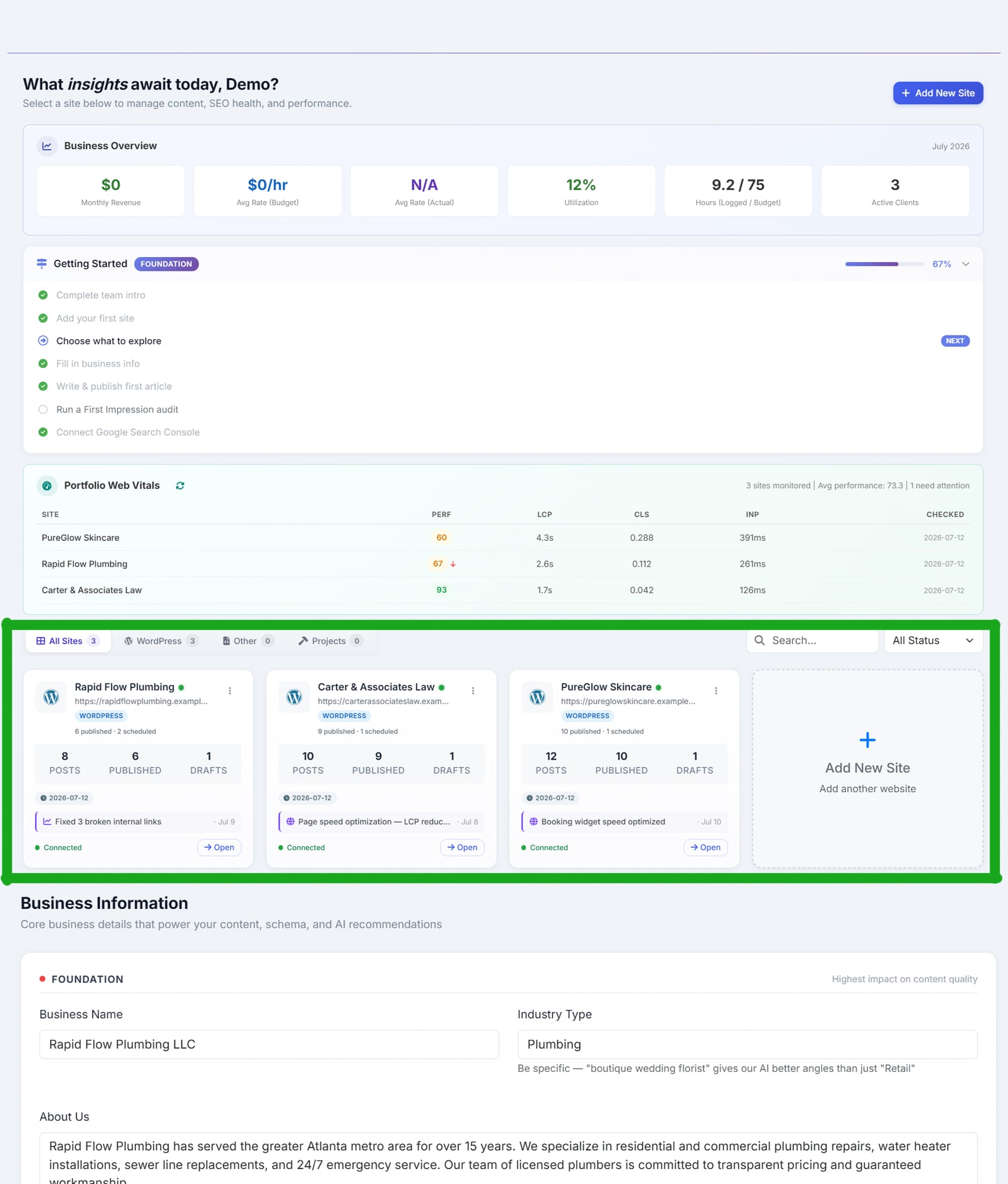
Thirty accounts, and what each one needs, on one screen.

Every client, with its state visible

Activity in the last seven days, whether publishing is running, whether Search Console is connected, when it last published, and how many tasks are overdue — on the card, without opening anything.

Ordered the way you think

Drag the list into your own priority and it stays that way. Filter by type, search, or pull up just the build projects.

Web Vitals watched across the whole book

Every site’s loading performance is compared against its own previous reading, and the ones that got materially worse are counted and flagged. It’s the one health signal AlmaSEO tracks fleet-wide.

Plan Free on every plan.

Powered bySeven-day activityAutomation stateOverdue task countsCustom ordering

The All Sites dashboard: a Business Overview strip with monthly revenue, average budgeted and actual hourly rate, utilization, hours logged against budget, and active client count; a Portfolio Web Vitals table listing every client with its performance score, largest contentful paint, layout shift and interaction delay, headed ‘3 sites monitored, average performance 73.3, 1 need attention’ with a red arrow beside the site that dropped; and below it a card per client showing published and scheduled post counts, the most recent piece of work with its date, and a connected status
Every client and what it needs — with the fleet-wide Web Vitals check flagging the one that slipped.

Strategy Game Plan

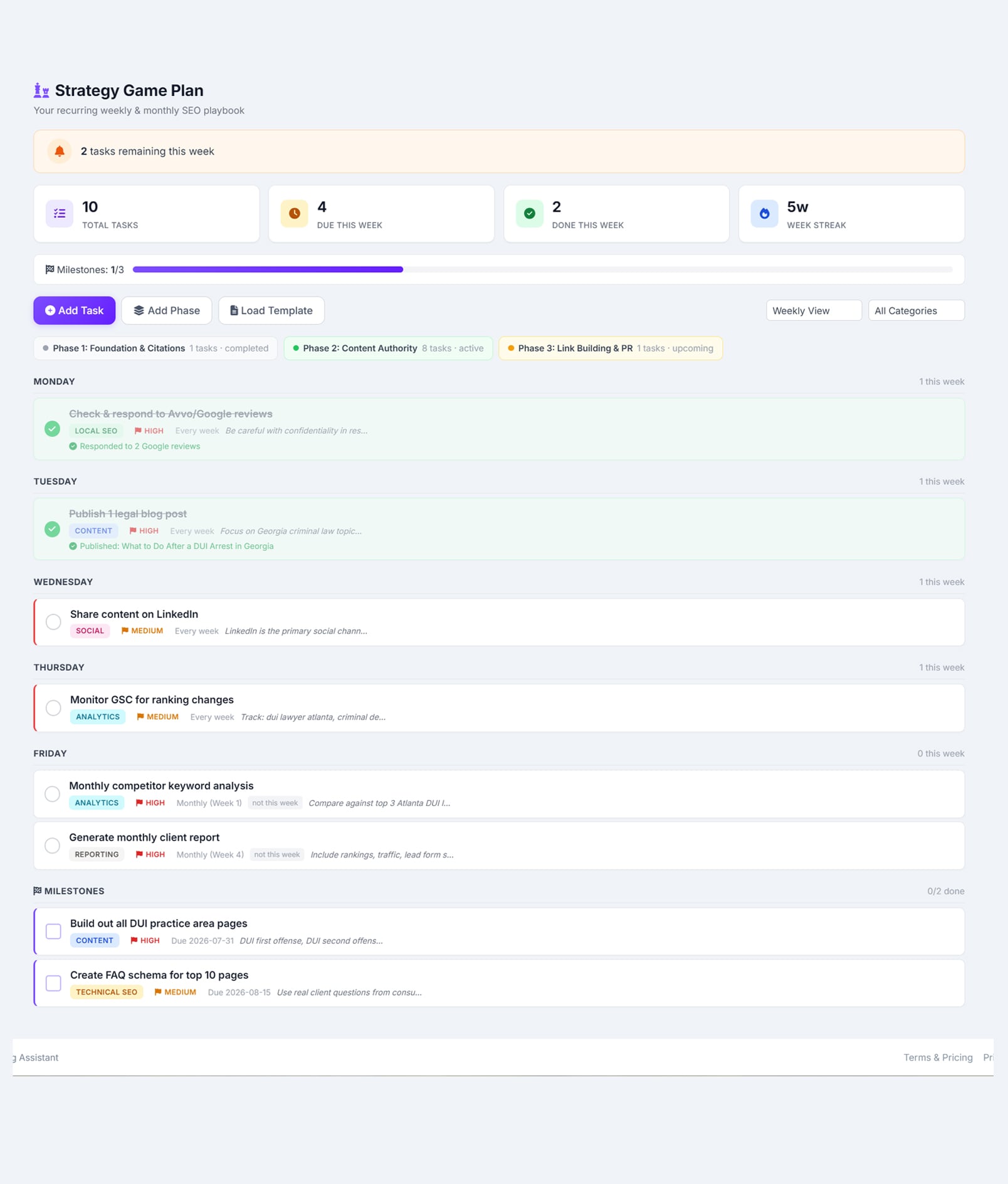
The recurring work you promised each client, as a plan that recurs.

Real recurrence, not a repeating to-do

Once, weekly, every other week on the weeks you choose, monthly on the second Tuesday or the 15th. The plan matches how retainers are actually written.

Phases that switch the plan on and off

An onboarding phase and an ongoing phase, where tasks only count as due while their phase is active. A three-month campaign stops nagging you in month four.

Due across every client, in one line

How many strategy tasks are due this week and how many are overdue, across your whole book — each one linking straight to the client it belongs to.

Four playbooks to start from

Local SEO weekly, e-commerce monthly, content-heavy weekly, and backlink building fortnightly. Load one and edit rather than starting at a blank plan.

Plan Pro and up.

Powered byOn-hold toggleReminder daysCompletion criteriaStreaksPhase management

The Strategy Game Plan for a law firm client, subtitled ‘Your recurring weekly & monthly SEO playbook’: a banner reading 2 tasks remaining this week, counters for total tasks, due this week, done this week and a five-week streak, and a milestone progress bar; three phases marked completed, active and upcoming; then the week laid out by day — a completed review-response task on Monday, a published blog post on Tuesday, a LinkedIn share on Wednesday, a Search Console check on Thursday — each tagged by category, priority and recurrence, with monthly tasks marked ‘not this week’ and two dated milestones listed at the bottom
One client's recurring playbook — by day, by phase, with what recurs monthly held back until its week.

Workload Planner

The one that tells you things you would not otherwise find out.

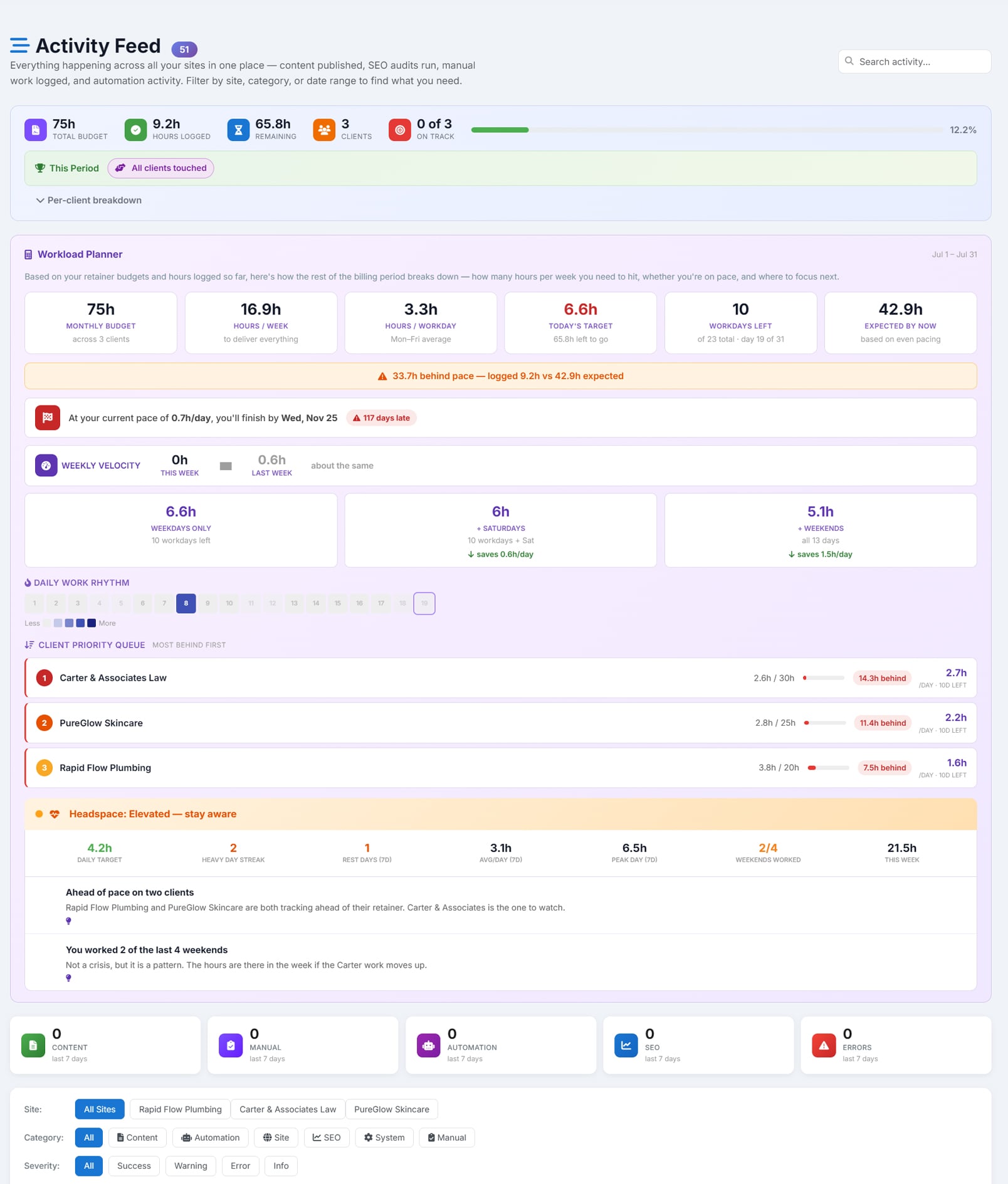
The pace you need vs the pace you keep

AlmaSEO works out the hours a day you’d now have to deliver, then compares it against your own average over the last thirty days. When the plan needs one and a half or two times your real pace, it says so — while there’s still month left to fix it.

Scope creep, named

Any client consuming twice the hours they were allocated gets flagged as scope creep, and the client taking the biggest share of your month gets named. The account quietly swallowing your week stops being invisible.

The clients going quiet

An active retainer with nothing logged against it for ten days is flagged, and it escalates at fourteen and twenty-one. Silence is how retainers get cancelled.

And when to stop

Consecutive long days, weekends worked across the last month, and stretches with no rest day at all — read together, not as a step count. Working every weekend is a fact about the business, not a personality trait.

Plan Agency. Needs retainer hours set on at least one client — the whole planner is built on the gap between hours sold and hours logged.

Powered byPer-client daily targetsCycles closing this weekOver-delivered clientsMomentum vs last monthUtilization and real hourly rate

The Workload Planner on the Activity Feed: a summary strip showing total budget, hours logged, hours remaining, client count and how many are on track; then the planner itself with monthly budget across three clients, hours per week needed, hours per workday, today's target, workdays left and hours expected by now — above an amber warning reading 33.7 hours behind pace, logged 9.2 against 42.9 expected; a projection of the finish date at the current pace; alternative daily targets for weekdays only, plus Saturdays, or all seven days; a client priority queue sorted most-behind-first naming three clients with how far behind each is; and a headspace panel reading Elevated, with the daily target, heavy-day streak, rest days, weekends worked, and two written notes — one saying two clients are ahead of pace and naming the one to watch, the other saying two of the last four weekends were worked and calling it a pattern rather than a crisis
“33.7h behind pace.” The clients ranked most-behind-first — and a note that you worked two of the last four weekends.

Activity Feed

Everything that happened, everywhere, in order.

One stream across every client

Published articles, audits, rank checks, logged work, connections — every site you can reach, in one timeline instead of thirty tabs.

Filtered down to the question you have

By client, by category, by severity, by source, by date, or by search. “What happened on this account last month” takes one filter.

Plan Agency.

Powered byPer-site filterSeverity filterDate rangeFull-text search

Team and access

People in the tool, without handing over the whole book.

Four roles, with real teeth

Owner, manager, analyst and viewer. Managers can invite, but only analysts and viewers — they can’t mint another manager. An owner can’t walk out without handing the org to someone.

Access granted client by client

Owners and managers see the whole book. Analysts and viewers see only the clients you explicitly grant them — enforced on the data, not hidden in the interface.

Invites that expire

Emailed, and dead after seven days. Seats are checked against your plan when you send one.

Plan Agency.

Powered byPer-site access matrixPending invitesRole changesSeat limits

Website build projects

For the redesigns and builds, not the retainers.

Tasks with one level of subtasks

Statuses, priorities, due dates, and milestones you can filter to on their own. Subtasks collapse under their parent with a done-of-total count.

A timeline you didn’t have to build

Milestones and dated tasks plotted on a horizontal timeline with a marker on today, which turns vertical on a phone.

A 34-point launch checklist, pre-loaded

Pre-launch, DNS and hosting, SEO and analytics, content and QA, post-launch. It seeds itself the first time you open it, so nobody writes the list from memory at midnight.

Plan Free on every plan — on sites you add as a Website Build Project. Retainer clients use the Strategy Game Plan instead.

Powered byMilestone filterProgress barProject notes with pinningClient info readiness

Ownership Tracker

Where the client’s logins and registrar details actually live.

A spreadsheet, behind its own password

Multiple sheets, formatting, undo — locked with a separate password per client and unlocked only for that session. Knowing your AlmaSEO login isn’t enough to open it.

The questions you ask at 2am

Who owns the domain, where the DNS is, whose card renews the hosting. The answers live on the client’s profile instead of in an email from 2023.

Plan Agency.

Powered byMulti-sheetPer-client passwordEmail password resetSession-scoped unlock

What AlmaSEO watches across every client — and what it doesn’t.

Every platform with a client list claims it spots problems across your whole book. Here is exactly where that’s true here, and where it isn’t.

It does watch page speed across every site.

Each site’s performance reading is compared against its own previous reading, and the ones that dropped materially are counted and flagged on your client list. That’s a genuine fleet-wide check, and you don’t have to open a single account to get it.

It does watch your delivery across every client.

Hours, retainers, pacing, silence, scope creep, revenue and margin are all computed across your entire book at once. This is the deep end of the product, and it’s the reason the operations layer exists at all.

It does not claim to find SEO patterns across your clients.

There is no engine here that spots the same ranking drop on six sites and tells you they share a cause. Tools that imply otherwise are usually describing a dashboard that puts numbers side by side and lets you do the noticing. AlmaSEO would rather say plainly where the automation ends.

Which plan you need.

Nothing in this area spends Data Credits. It’s all built from work you log and clients you add.

Free, on every plan

The client list with its live state, the fleet-wide Web Vitals check, the cross-client revenue and margin view, website build projects with their timeline and launch checklist, and Alma, the assistant that can answer “which client have I neglected” out loud.

Pro

The Strategy Game Plan — the recurring work each client is owed, with the phases and recurrence rules that make a retainer run itself, and the weekly roll-up of what’s due across every account.

Agency

The Workload Planner, the cross-site activity feed it lives on, team roles with per-client access, and the Ownership Tracker. The planner alone is the reason to be here — nothing else on the market will tell you a client has quietly doubled their hours.

One honest note on the build-project tools: Tasks, Timeline, Notes and the Launch Checklist appear on sites you add as a Website Build Project — they’re for redesigns and new builds. Ongoing retainer clients get the Strategy Game Plan instead, which is built around recurring work rather than a finish line.

See what running the book actually looks like.

Open a client’s work plan in the demo, then look at the client list behind it — the same data the pacing math reads.