Start your 14-day free trial Every Agency feature switched on. No card required.

AI Overview Tracker

AI Overview tracker: find out whether Google cites you, or a competitor.

Google now answers a growing share of your keywords itself, in an AI Overview sitting above the results. Somebody gets cited as the source of that answer. This tells you which of your keywords are affected, whether the cited source is your page or somebody else’s, and exactly whose — taken from your own Search Console keywords, not a list you have to invent.

Ranking first stopped meaning what it used to mean.

You can hold position one and still lose the click. When Google writes an AI Overview for a query, the answer sits above every organic result, and the searcher often has what they came for before they reach you. Your rank tracker reports the same green number it always did. Your traffic doesn’t match it any more.

The frustrating part isn’t that it happens. It’s that it’s invisible. Search Console will tell you impressions and clicks; it will not tell you that an AI Overview appeared on that query, and it will certainly not tell you that Google quoted a competitor’s page to answer it. So the first time most people learn about any of this is when a client asks why traffic is down on a keyword they’re still ranking for.

AI Overview tracking closes that gap. It takes the keywords you already earn impressions on, checks what Google is actually showing for each one, and reports whether the answer credits you or somebody else. Not a sample of national keywords — yours.

AI Overview tracking for the agency being asked about it — and the owner watching clicks fall.

For the agency or consultant

“Are we showing up in AI?” is now a standing client question.

It arrives in every review call, and “we’re looking into it” has a short shelf life. What ends the conversation is a table: these are your keywords, these are the ones Google answers itself, here is where you are the cited source, and here is the competitor being quoted on the rest.

  • A per-client answer, from that client’s own keywords
  • The competitor names to point at in the meeting
  • A record over time, so you can show it moving

For the site owner

The rankings held. The traffic didn’t.

You’re still on page one for the terms that matter and the clicks are drifting down anyway. Before you rewrite anything, it’s worth knowing whether Google is answering those searches itself — and whether it’s using your page to do it.

  • Which of your keywords return an AI answer at all
  • Whether your page is the source being quoted
  • Which pages of yours Google already trusts

How the AI Overview tracker works, in four steps.

You press one button. Everything below happens against your own data.

  1. Takes your keywords

    Your top 25 keywords by impressions, pulled straight from Google Search Console. Nothing to type, nothing to guess — these are the searches already putting you in front of people.

  2. Checks the live result

    For each keyword it looks at what Google is showing right now, and flags an AI Overview, a Featured Snippet, or a People Also Ask box.

  3. Looks for you in the sources

    Where there’s an AI Overview, it reads the sources credited underneath and checks whether one of them is your domain — reporting the exact URL that got cited.

  4. Names who got cited instead

    Where you aren’t the source, it lists the competitors who are, and counts how often each one appears across the whole scan.

Every check is kept, so the second scan is a comparison rather than a fresh opinion. You choose when to run one — it doesn’t poll in the background or email you, and nothing changes on the page until you ask it to.

What the AI Overview tracker shows you.

Four counts at the top, then the row-by-row detail underneath.

Keywords checked

How many of your Search Console keywords went into this scan — up to 25 at a time, ordered by impressions so the most valuable ones are always covered.

How many return an AI answer

The count of your keywords where Google produced an AI Overview at all. This is the number that tells you how exposed you are, before any question of who gets cited.

Where you’re the cited source

Keywords whose AI Overview credits your domain, with the exact URL Google chose. These are pages worth studying — whatever they’re doing is what got them quoted.

Where you’re not

The gap, keyword by keyword, with the competitor domains cited in your place and the impressions each keyword earns you. That last column is what turns a curiosity into a priority.

Who gets cited most

A roll-up across the whole scan counting how often each competitor was quoted and on which keywords. One domain appearing repeatedly is a content pattern worth taking apart.

Featured snippets and People Also Ask

Flagged alongside the AI Overview, because they’re the same battle: Google answering the query on its own page rather than sending the click on.

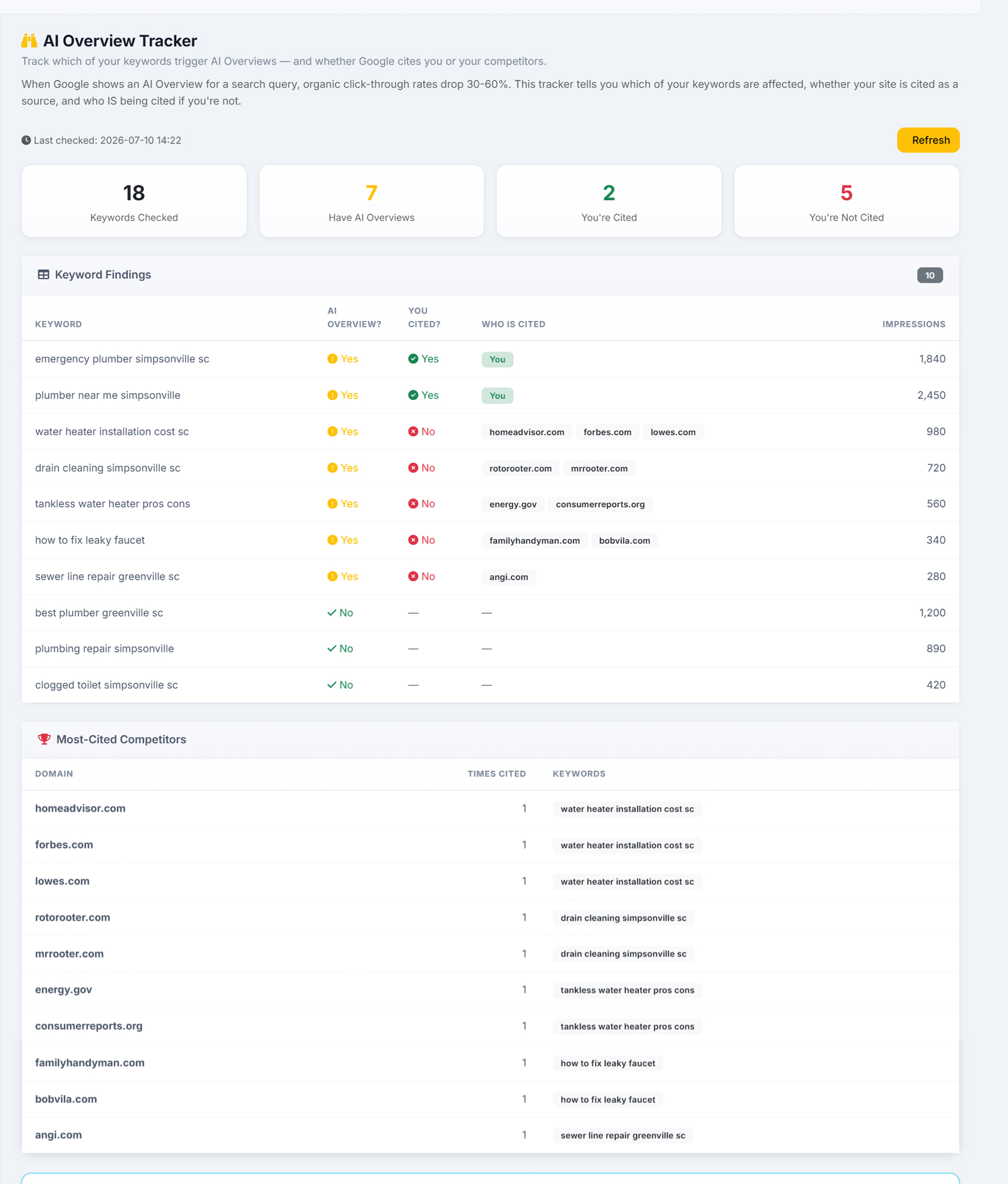
The AI Overview Tracker showing keywords checked, how many return an AI Overview, and which of them cite the site
Eighteen keywords checked, seven answered with an AI Overview, two where this site is the cited source and five where it isn’t. In the findings table “plumber near me simpsonville” and “emergency plumber simpsonville sc” come back marked You — Google is quoting this site to answer them. “water heater installation cost sc” is answered with homeadvisor.com, forbes.com and lowes.com instead, and “drain cleaning simpsonville sc” with rotorooter.com and mrrooter.com, each row carrying its Search Console impressions so you can see what the lost citation is worth. Underneath, a most-cited competitors table counts how often each domain was quoted and on which keyword.

What to do when the AI Overview cites someone else.

Tracking it is the easy half. These are the moves the data points at.

Start with the keywords that cost you the most.

Every row carries its Search Console impressions, so sort by that and work down. A keyword with 2,000 impressions where a competitor is quoted is worth more attention than five with 200 — and it makes the case for the work to whoever signs off on it.

Read the pages Google chose.

The competitor URLs aren’t just names to resent. When the same domain is quoted across several of your keywords, it’s doing something structurally — answering the question directly near the top, marking it up so it can be lifted cleanly, being specific where you were general.

Copy yourself before you copy anyone else.

The keywords where you are cited are the most useful pages you own. Whatever made those quotable is a pattern you can apply to the pages that lost, and you already know it works on your own domain.

Then grade the page and fix what’s missing.

AlmaSEO scores any page on how quotable it is to AI and hands back the specific fixes — structure, schema, whether the AI crawlers can even reach it. That is the wider AI search optimization work, and it’s where tracking turns into a change.

What AI Overview tracking costs, on every plan.

This one isn’t locked behind a tier. It’s metered instead, and it’s worth being straight about which.

Available on Solo, Pro and Agency

There is no upgrade gate on the AI Overview Tracker. The cheapest plan we sell runs the same scan the most expensive one does, against the same live results.

Each scan spends Data Credits

Checking a live search result costs money on our side, so it costs credits on yours — roughly 25 per keyword, which puts a full 25-keyword scan around 625. You confirm the spend before it runs, and you always see the number first.

Looking again is free

Results are cached for six hours and kept permanently afterwards, so re-opening a scan, showing it to a client, or comparing it against last month costs nothing. You only spend when you ask for fresh results.

Search Console has to be connected, because that’s where the keywords come from. Without it there is nothing to check — the tracker will tell you so rather than scanning a list of guesses.

AI Overview tracking questions people actually ask.

How do I know if Google shows an AI Overview for my keywords?

Run the AI Overview Tracker. It takes your top 25 keywords by impressions straight from Google Search Console, checks what Google is currently showing for each one, and flags whether that keyword returns an AI Overview, a Featured Snippet or a People Also Ask box. You get a count of how many of your keywords are affected and a row-by-row breakdown underneath.

Does Google's AI Overview cite my site or a competitor?

That is the question the tracker is built to answer. Where a keyword returns an AI Overview, it reads the sources credited underneath and checks whether your domain is among them — reporting the exact URL Google cited. Where you aren't the source, it names the competitor domains that are, up to five per keyword, and counts how often each one appears across the whole scan.

Where do the keywords come from — do I have to enter them?

No. They come from your own Google Search Console data: the top 25 by impressions, so the scan always covers the searches already putting you in front of people. That does mean Search Console has to be connected — without it there is nothing to check, and the tracker will say so rather than scanning a list of guesses.

Do I need a higher plan for AI Overview tracking?

No. It isn't locked behind a tier — Solo, Pro and Agency all run the same scan against the same live results. What it uses instead is Data Credits, roughly 25 per keyword, so a full 25-keyword scan comes to around 625. You confirm the spend before it runs.

Does it keep checking on its own?

No, and that's deliberate. You choose when to run a scan, because each one spends credits. Every check is stored, so once you've run a second one you're looking at movement rather than a fresh opinion — but nothing polls in the background and nothing emails you.

Why does an AI Overview matter if I still rank first?

Because the AI Overview sits above the organic results, so a searcher can get what they came for without reaching your listing. Your position doesn't change and your clicks do — which is why the drop is so hard to diagnose from a rank tracker alone. Knowing which keywords are affected, and whether you're the source being quoted, is what turns an unexplained dip into something you can work on.

What do I do about the keywords where a competitor is cited?

Sort by impressions and start where the loss is biggest. Read the pages Google chose — a domain quoted across several of your keywords is doing something structural you can learn from. Then look at the keywords where you are cited, because those pages are already proof of what works on your own site. AlmaSEO will also grade any page on how quotable it is to AI and hand back the specific fixes.

See which of your keywords Google answers itself.

Open the demo and look at a real scan — the keywords, the AI answers on them, and the competitors cited where the site didn’t make it in.